DCS Analytics

Twenty years of photos.
Finally find them again.

Fotowerk finds duplicate photos and photos that did not turn out, and helps you sort your collection into clear folders. You check the suggestions and choose your own categories.

For Windows 10 and 11 · English and German · Runs entirely on your computer

€14.99 once · free trial

No subscription. No user account. Your photos stay on your computer.
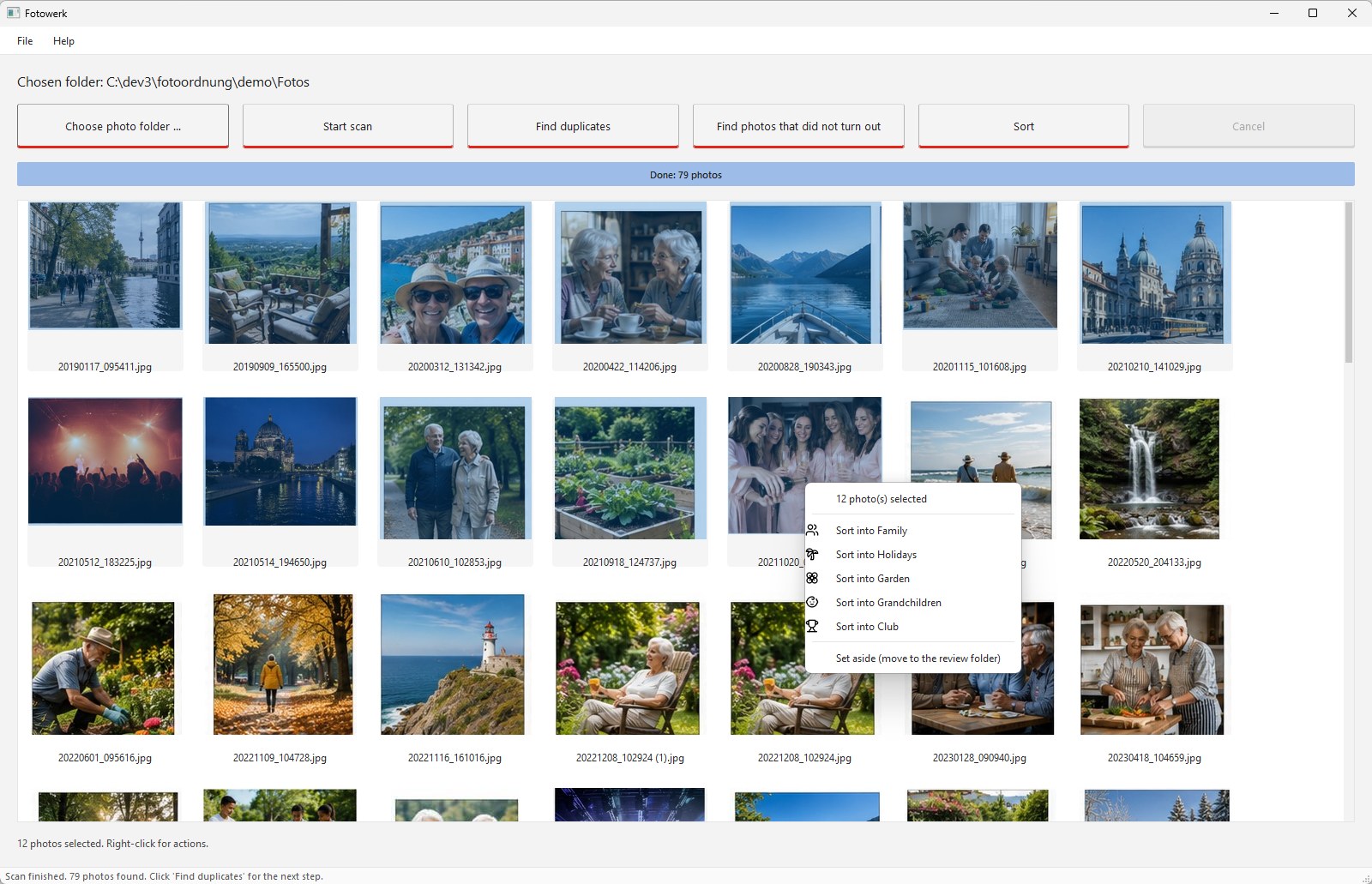
Fotowerk main window: twelve selected photos and the right-click menu with the categories
Twelve holiday photos selected, right-click, "Sort into Holidays". Click the picture to see it full size.
How it works

An afternoon with Fotowerk.

Five stations, each with the real screen. Every picture opens full size with a click.

STATION 1

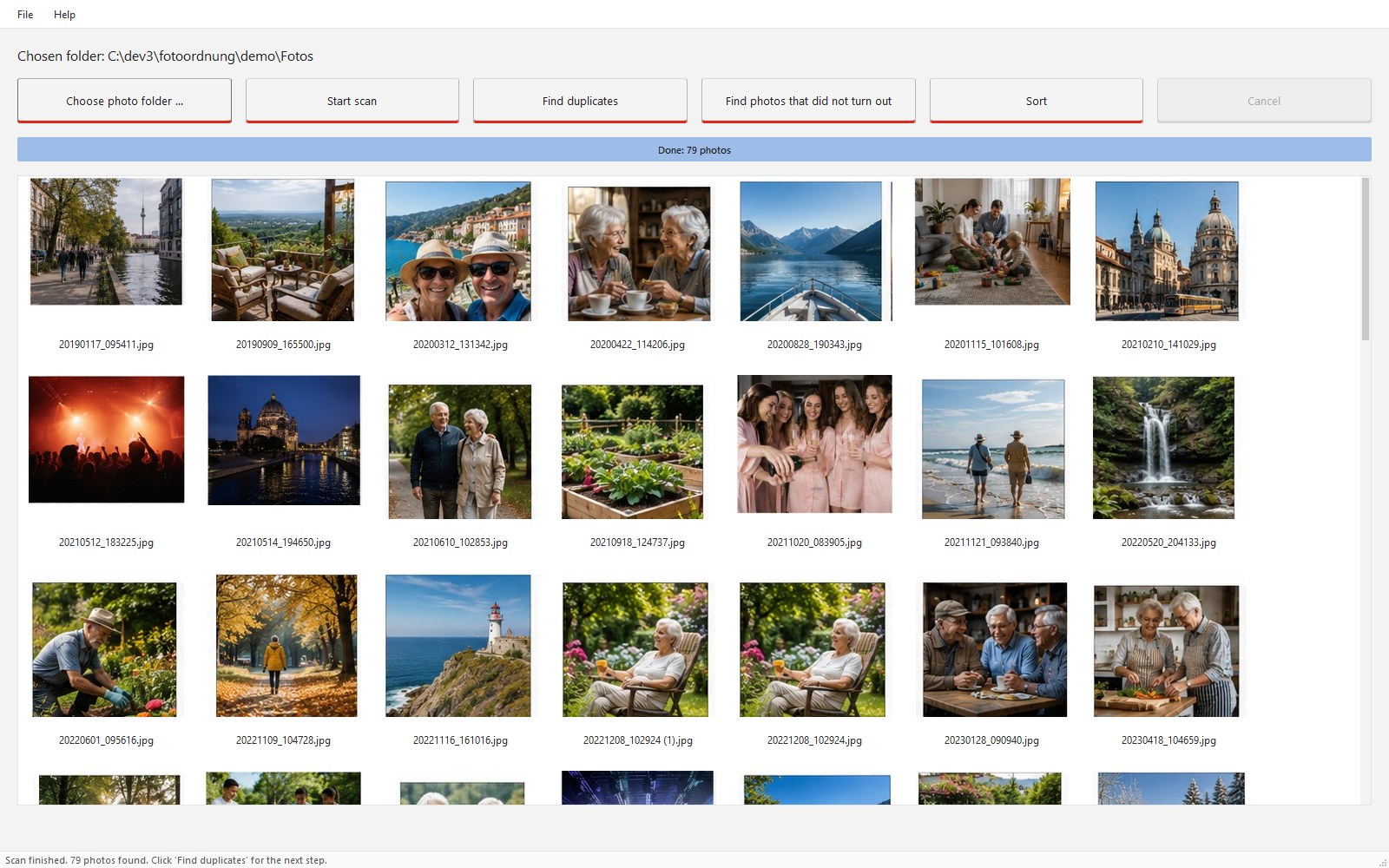
Choose a folder, Fotowerk has a look

You choose the folder with your photos, subfolders included. In this step Fotowerk changes nothing.

Fotowerk main window after the scan: all photos as previews, three main buttons
After the scan: every photo in view, nothing changed.
STATION 2

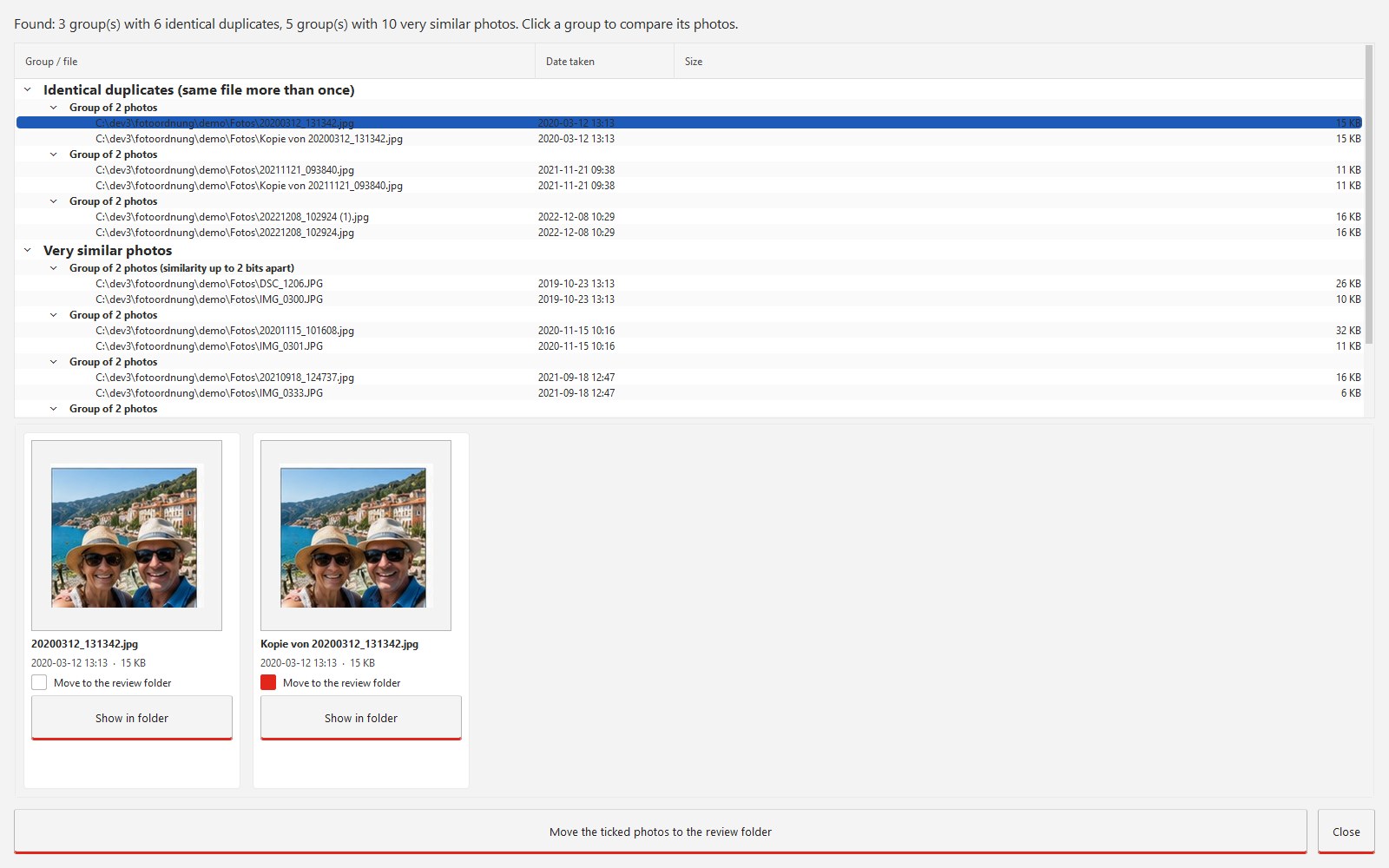
Duplicate photos side by side

Identical and almost identical pictures appear as a group. You set the ticks, Fotowerk moves the ticked ones to the review folder.

Duplicates dialog: groups of identical photos, below them two pictures compared with tick boxes
Identical pictures as a group. The first one stays, the others are ticked.
STATION 3

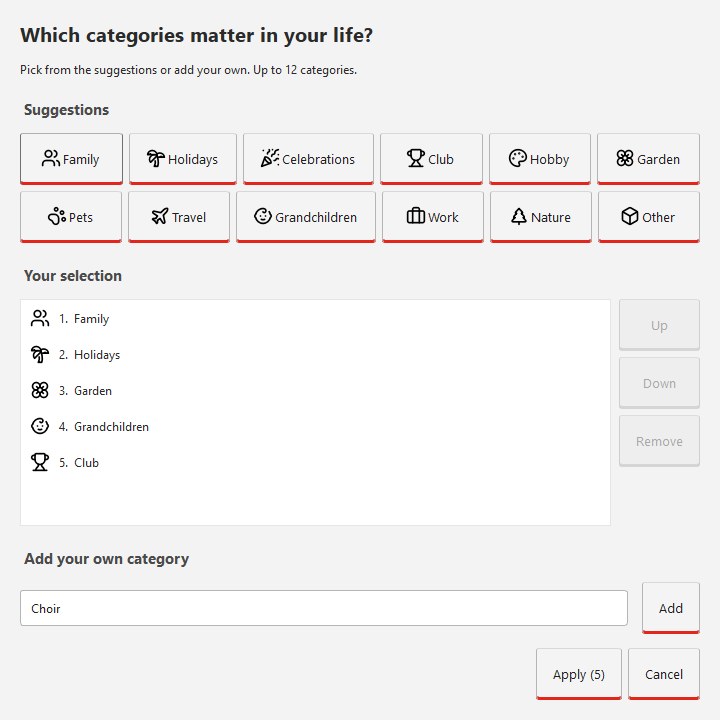
Your categories, your names

The first time you sort, you set up to twelve categories. Fotowerk suggests twelve, you change or replace any name.

Set up categories: twelve suggestions, your own selection, a field for your own names
Your categories, your words. Up to twelve.
STATION 4

Sorting: many at once or one after the other

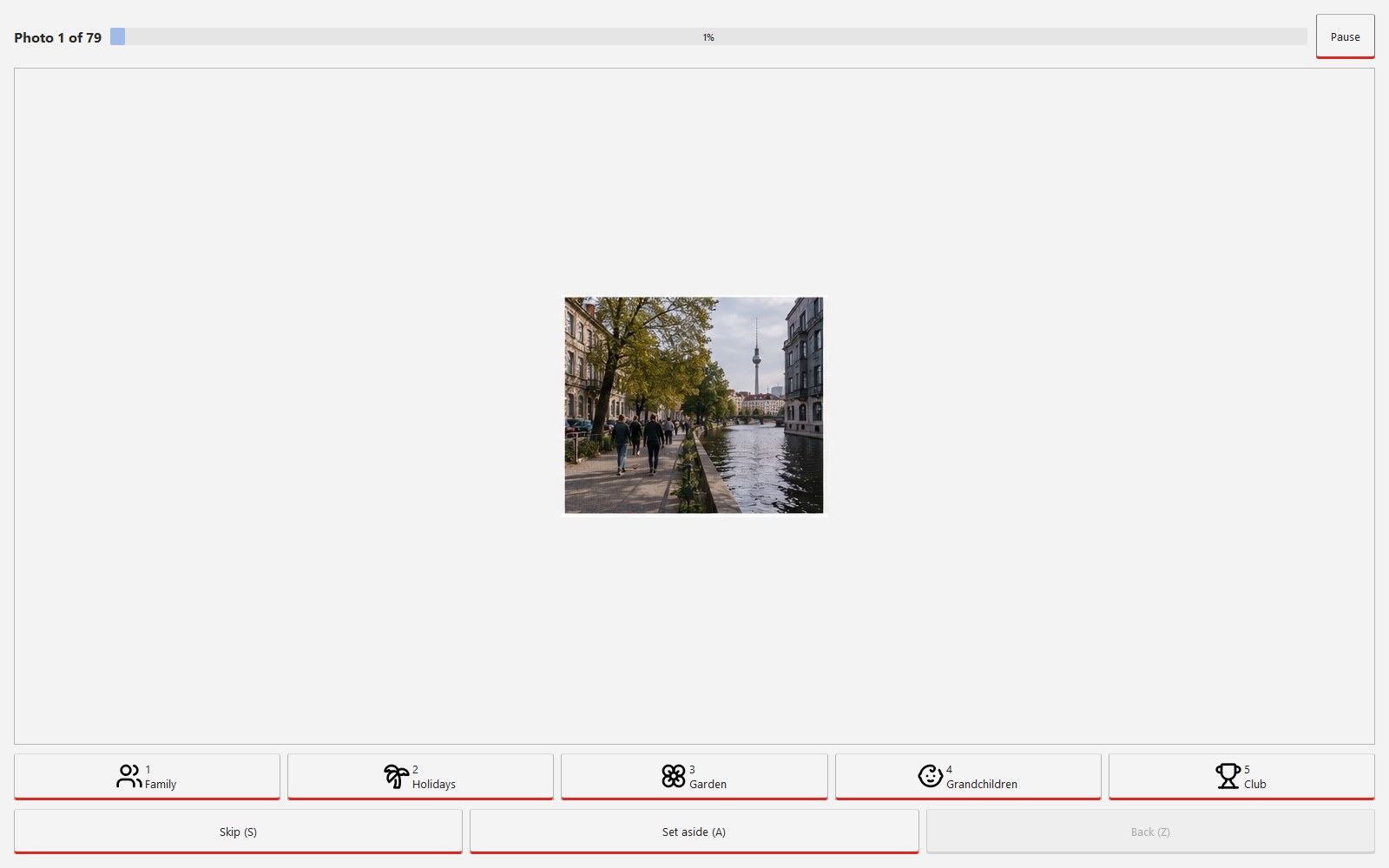
Select a whole batch, right-click, category: done. Single cases afterwards in full screen with one click or a digit from 1 to 9. The year folders appear along the way.

Click sorter: one large photo, below it the category buttons with digits 1 to 5 and the Back button
One photo, one click or one digit. The Z key takes the last step back.
STATION 5

The result: normal folders

Family, 2023, IMG_0042.JPG. Every computer reads these folders, today and in twenty years. Without Fotowerk.

Photos\
├─ Family\
│  ├─ 2021\
│  ├─ 2023\
│  └─ 2024\
├─ Holidays\
├─ Garden\
├─ Grandchildren\
├─ Club\
└─ _Review\
   ├─ _backup_2026-11-09.zip
   ├─ IMG_0300.JPG            (blurry)
   └─ Copy of IMG_0042.JPG    (duplicate)

The afternoon is an example. How long you need depends on the number of your photos and on how many you want to look at one by one.

What happens to my files?

Fotowerk moves. It does not copy, it does not delete.

Your pictures stay in the photo folder you chose and only change their subfolder. Content and file name stay the same.

Set-aside pictures go to the review folder

Duplicates and photos that did not turn out go to the folder _Review inside your photo folder. Fotowerk creates a ZIP backup of these pictures first. You delete when you are sure. Or never.

Fotowerk keeps a log while sorting

Every moved file is listed with its old and new place in a log file. In single sorting the Z key takes the last step back.

Identical file names are kept

When two files with the same name meet, the second one gets a number appended. Nothing is overwritten.

Duplicate means two things

Fotowerk reliably recognises files that are exactly the same. Re-compressed or slightly downsized copies of the same picture are found with an image fingerprint. Heavily cropped variants count as photos of their own.

Three steps

What Fotowerk does and what you do.

StepFotowerkYou
1 ScanReads every photo in the chosen folder, subfolders includedChoose the folder
2 CheckFinds duplicates and photos that did not turn out, with a reasonSet or remove the ticks
3 SortCreates category and year folders and moves the filesDefine categories and assign photos, one by one or in batches
Who is behind it

Developed and supported in Rangsdorf near Berlin, Germany.

Fotowerk comes from Arne Bailliere. He developed it and answers support requests himself, in English or German, usually within two working days: info@digitalconsultancysolutions.com.

Sales and invoicing run through DCS Analytics, a brand of Universe Connect KG. Full address in the legal notice.

Arne Bailliere, developer of Fotowerk
Arne Bailliere
Questions before buying

What you should know.

Can I try Fotowerk first?

Yes. The trial version is the same installer. Scanning, finding duplicates and checking are unlimited, moving up to 500 photos. After that you unlock it with the key, your work is kept. Download the trial version (about 230 MB)

What do I get after buying?

An email with the download link and your key, right away. The installer is signed, Windows shows "Verified publisher: Arne Bailliere".

How many computers does one licence cover?

One key is valid for up to three devices, for example PC, laptop and a spare machine.

Do I need internet?

Once, to activate the key. Never again after that. You can switch off the Wi-Fi while sorting.

Which file formats?

JPEG, HEIC from the iPhone, PNG, TIFF, WebP, BMP and GIF. Videos are not sorted in version 1.

How many photos?

Tested up to 100,000 photos. On an SSD the scan takes about three minutes per 50,000 photos, the duplicate search longer.

Which language?

Fotowerk starts in English on an English Windows and in German on a German one. You can switch under Help at any time. The manual is included in both languages.

Which updates are included?

All 1.x versions. A later version 2 is optional, the version you bought keeps running without limit.

What if it does not work for me?

14-day money-back guarantee from the date of purchase. An email to info@digitalconsultancysolutions.com is enough.

I am not very experienced with computers. Can I manage?

The app has three large buttons with plain labels. If you write a letter or read email on your computer, you can use Fotowerk.

Can I edit pictures?

No. Fotowerk sorts. Editing is a craft of its own and needs its own program. Once the collection is sorted, you find every picture and open it with the program of your choice.

Fotowerk – €14.99 once

One key, three devices, all 1.x updates. Support by email in English or German. Payment by card or PayPal, delivery by email right away. 14 days money back.

Signed Windows installer · Windows 10 and 11 · No subscription